Introduction
I've been using MorphMan for years, but it was no longer maintained. I decided to update the add-on for compatibility, bundle it with my personal files, and add new features.
Credit goes to those who made MorphMan what it was before this version (https://github.com/kaegi/MorphMan and later https://github.com/ianki).
This guide explains how to use the new version, for long-time users and newcomers alike.
Why use MorphMan?
MorphMan reads the Japanese in your Anki cards and works out which words you know.
With that, you can:
- Find media at your level: anime, video games, movies, manga, visual novels…
- See which words you're missing to reach your goal
- Learn those words with your own cards, or with new cards made from real examples
- Reorder your new cards so the ones with only one unknown word come first
The next page is a quick start, to get going as fast as possible. The rest of the guide goes into detail, step by step.
Good to know
- It's free, and it will stay free. No account, no subscription.
- The Japanese dictionary (MecabUnidic, about 500 MB) is too big for AnkiWeb. MorphMan downloads it for you the first time you start it.
- It can work with other languages, but the focus is on Japanese.
About AI
I think it's becoming more and more important to say how AI was used to make a tool.
The core functions already existed, as I mention above. AI helped me code the new functions, a lot of them for the UI. It also helped me write this guide, because English is not my first language.
AI is not used at all for the Japanese in this add-on. MeCab, with the UniDic dictionary, cuts sentences into words. The meanings come from Jitendex, or your own Yomitan dictionaries.
I use MorphMan every day for my own studies, so everything is constantly being tested.
Questions
If something is unclear or doesn't work, come and ask on my Discord.
You can also open an issue on GitHub.
Quick Start
The short version. Each step has its own page if you want more.
1. Install MorphMan
Install MorphMan (JoMako) from AnkiWeb, then restart Anki. See Installation.
2. Download the dictionary
The first time you start Anki, MorphMan asks to download MecabUnidic, the Japanese dictionary (about 500 MB).
Click yes. A small window shows a few slides while it downloads. You can keep using Anki.
When it's done, restart Anki.
If you said no, MorphMan asks again at the next start. You can also go to Settings > Parsing and click Download and install.
3. Tell MorphMan which cards to read
Open the Analyze Cards tab.
In Identify Cards, add a line for your Japanese note type and pick the field with the Japanese sentence.

Choose what MorphMan does with these cards:
- Count Words: it only learns which words you know. Example: a premade deck that teaches the most common vocabulary.
- Modify: it also fills the MorphMan fields and adds tags. Example: a sentence bank, with cards you can use as examples for the words you want to study.
- Reorder: same as Modify, and it also sorts your new cards. Example: your study deck.
With Modify or Reorder, the Modify Cards section appears.
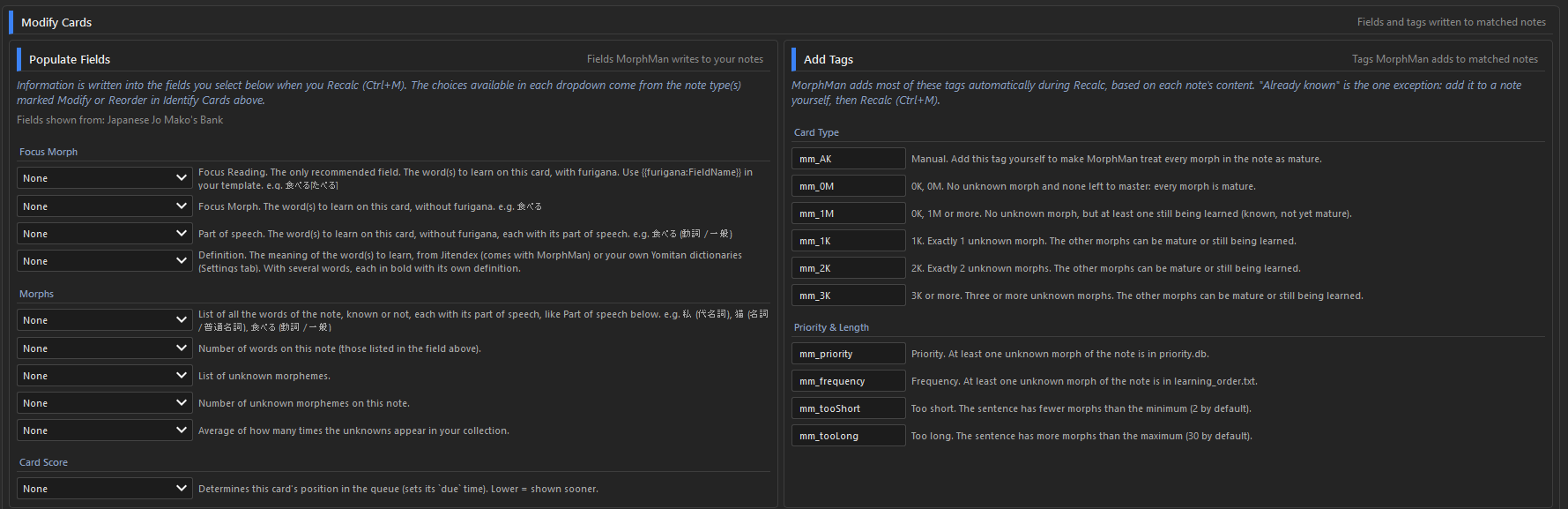
Use Populate Fields to link the MorphMan fields you want to the fields of your note type. At least Focus Morph or Focus Reading is recommended.
You can also rename the tags in the Add Tags section. Leave a tag empty if you don't want it.
4. Run Recalc
Click Recalc, or press Ctrl+M.
5. Find media at your level
Open the Readability tab.
Check the media you're interested in. It can take a minute, so maybe pick only one the first time.

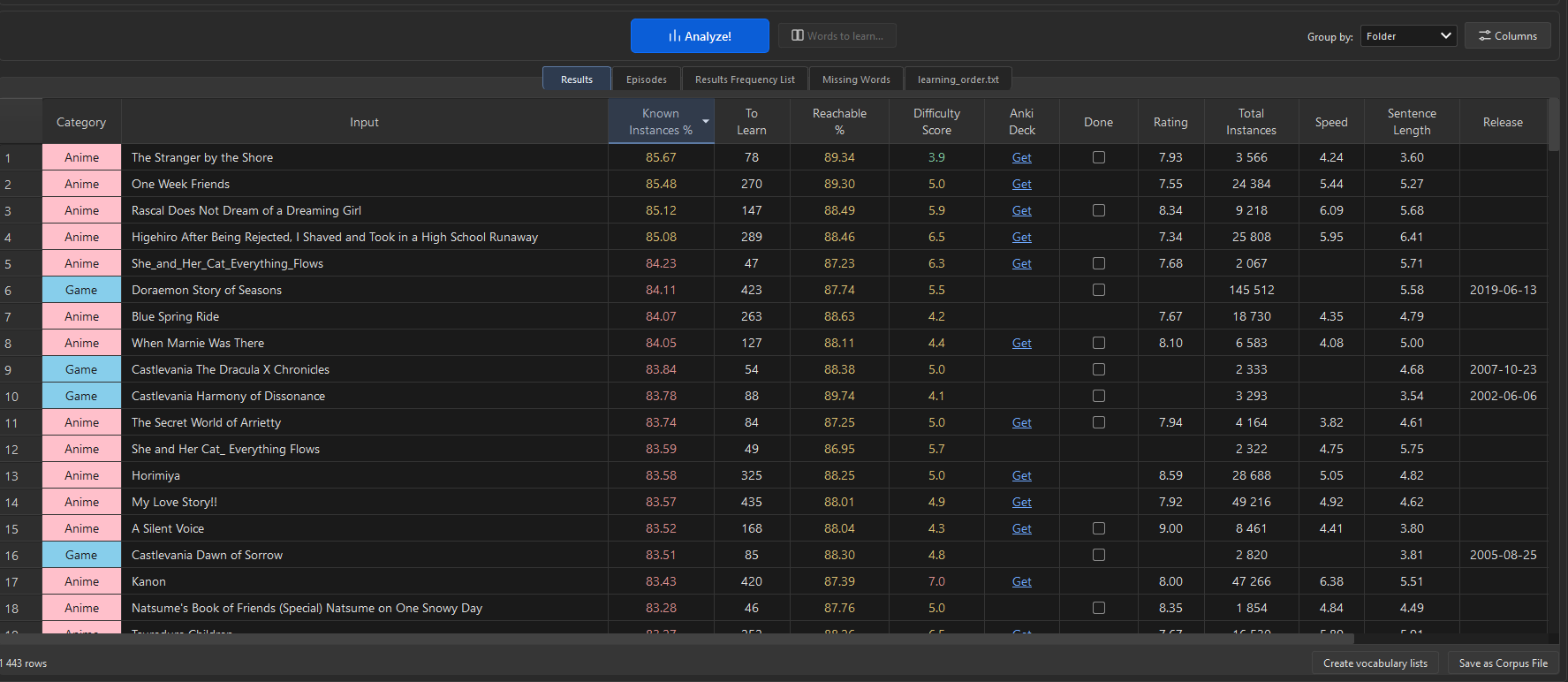
You get a lot of data, but mainly:
- Known Instances %: how much of the text you already know.
- To Learn: how many words you need to reach your goal.
- Difficulty Score: how hard each title is.
- Anki Deck: a direct link to download a premade deck with all the sentences.
- Done: to filter out the titles you've already studied or aren't interested in.
6. Study Plan
You can filter the words you want to learn by two factors:
- Rank limit: to focus on the most frequent words.
- Target readability: to set how much you want to understand.

7. Words to Learn
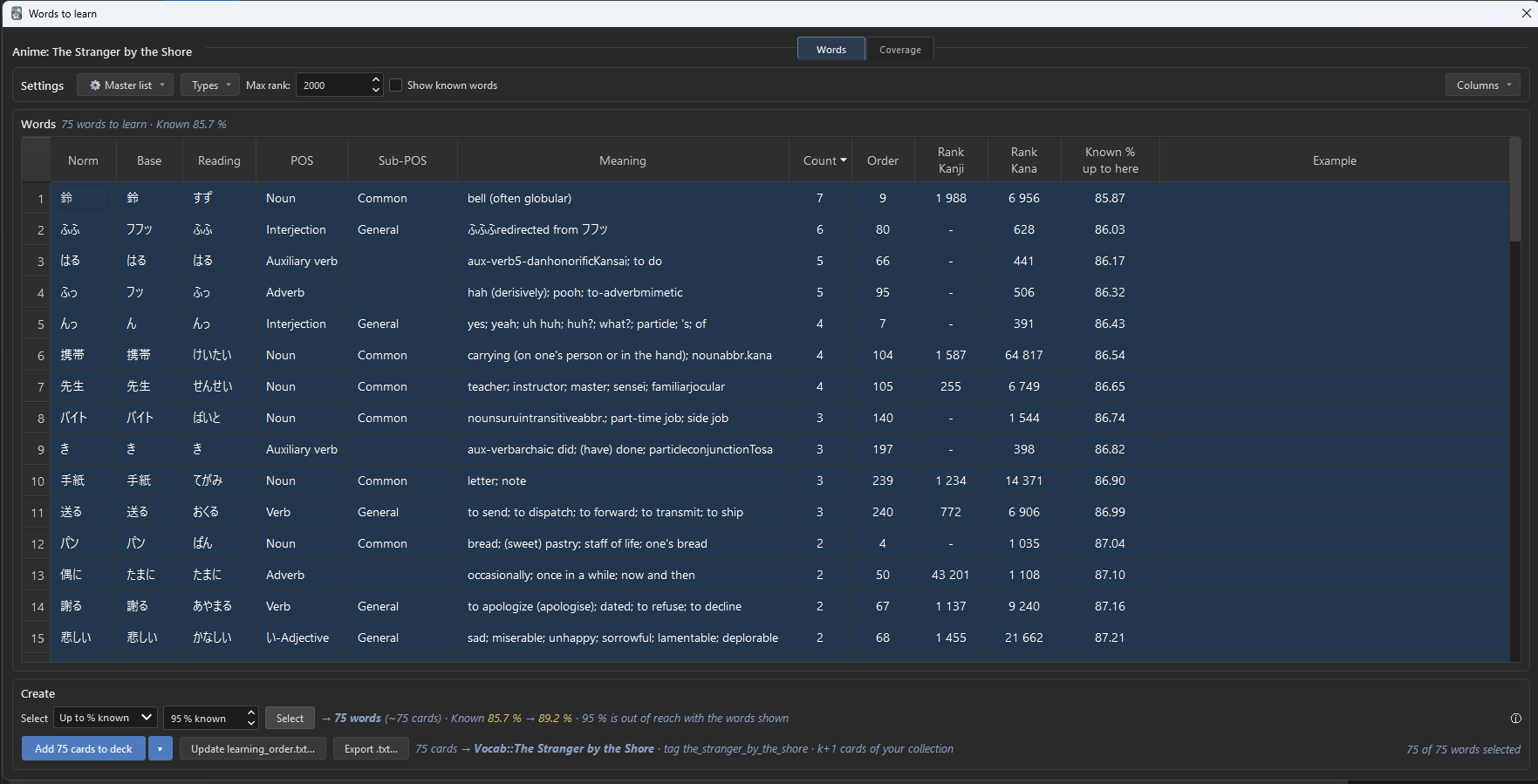
Select a title in Results, then click Words to learn… (or double-click the row).
You get its unknown words, the most frequent first.
Select the words you want. The Select bar helps:
- First rows: the first N words.
- Up to % known: enough words to reach a %, for example 90 %.
- By Count: the words that appear at least N times.
No selection? The buttons use every word shown.
Then, 3 choices:
- Add to deck: makes the cards. A sentence from your own cards when there is one, with its sound and picture. Otherwise, a vocab card. See Adding words to a deck.
- Update learning_order.txt…: at the next Recalc, your cards that teach these words come first.
- Export .txt…: saves the words as a file, to import in Anki with File > Import.
Glossary
The words you'll see everywhere in MorphMan and in this guide.
Morph
A word, more or less.
MorphMan cuts each sentence into morphs with a dictionary (MeCab). Conjugated forms count as the same morph: 食べた and 食べます are both 食べる.
Known, mature, seen
How well you know a morph, from the cards it is on:
- Seen: on a card you have reviewed at least once.
- Known: on a card you have answered correctly at least once, even if it is still in learning (an interval of a few seconds is enough).
- Mature: on a card with an interval of at least 21 days, like in Anki.
You can change these thresholds. See Settings.
k+1
A sentence with exactly one word you don't know.
You can read everything else, so you learn the new word from context. MorphMan puts these cards first.
The k stands for known: everything you know, plus one new word. The idea comes from linguist Stephen Krashen's i+1: input just one step above your current level (i). You may have seen other letters (i+1, n+1…). It's the same principle.
Focus morph
The new word of a k+1 card. MorphMan writes it in a field of the card, so you can see it, or look it up.
Recalc
The scan that reads your collection, finds what you know, fills the MorphMan fields and tags, and sorts your new cards (Ctrl+M).
To be quick, Recalc only goes over the notes that changed since the last one, and the notes with a word you learned since.
Full Recalc (Ctrl+Shift+M) goes over every note. You rarely need it: Recalc does a full one by itself the first time, when you change a setting or learning_order.txt, and once a week. See Recalc and Full Recalc.
Title
A show, a game, a manga, a movie… in Readability.
A title is a folder with one or more files: .srt and .ass subtitles, .txt text, game scripts.
Corpus
A corpus file (.corpusdb) holds the words of a medium (Anime, Game, Manga, Movie, TV, VN), already counted from the original files.
When you analyze, MorphMan reads the corpus instead of going through every subtitle or text file again. It saves a lot of time.
Known Instances %
How much of a title you understand now: the share of all the words in it, counting each time a word appears, that you know.
At 90 % you meet about one word you don't know per sentence. At 98 %, almost none.
Coverage
How many new words you need to reach a given Known Instances % (80, 85, 90, 95 or 98 %), the most frequent first.
To Learn and Reachable %
In the Readability results:
- To Learn: how many words you still need to reach your target on a title.
- Reachable %: what you'd understand once you know them.
Difficulty Score
How hard a title is, from 1 (easy) to 10 (hard). It is the same for everyone, whatever you know.
Master frequency list
One big list of Japanese words, the most common first. It is used to rank words, and to choose the most useful ones to learn.
learning_order.txt
Your own list of words to learn, in order. MorphMan uses it to sort your new cards. See learning_order.txt and the Master list.
Known database (known.db)
The list of words MorphMan thinks you know.
You can load a ready-made one (Genki, Tango, WaniKani level…) to start with the words you already studied elsewhere. See Database Manager.
Done and Excluded
In Readability, you can mark a file:
- Done: you watched, played or read it.
- Excluded: left out of the analysis completely.
Jitendex
The Japanese–English dictionary that comes with the add-on. It gives the meaning of the words in Words to learn and on the cards you add.
Installation
1. Install MorphMan
Two ways:
- From AnkiWeb: in Anki, Tools > Add-ons > Get Add-ons…, then enter the code
73983788. - From GitHub: download the latest
.ankiaddonfile from the releases. Double-click it, or use Tools > Add-ons > Install from file…
Restart Anki.
MorphMan works with Anki 2.1.50 and later.
2. Install the dictionary (MecabUnidic)
MorphMan cuts Japanese into words with MeCab and the UniDic 3.1.0 dictionary. UniDic is about 500 MB: too big for AnkiWeb. So it's an add-on of its own: MecabUnidic.
When you start Anki, MorphMan asks to download and install it for you. Click Yes.
A window shows the progress, with MorphMan in a few slides. You can keep using Anki. Closing the window doesn't stop the download.
When it's done, restart Anki.
If you said no
MorphMan asks again at each start, until you check Don't ask again.
You can also do it later: Tools > MorphMan > Settings > Parsing > Download and install.
By hand
If the download fails:
- Download
MecabUnidic3.1.0.ankiaddonfrom its GitHub page. - Double-click the file, or Tools > Add-ons > Install from file…
- Restart Anki.
Settings > Parsing tells you if MecabUnidic is installed.
Coming from the old MorphMan?
Turn the old MorphMan off in Tools > Add-ons. The two can't run together.
Your databases (known words, priority.db, external.db…) are in your profile's dbs folder. The new version reads them as they are.
Next
Tell MorphMan which cards to read: Analyze Cards.
Analyze Cards
Tools > MorphMan > Analyze Cards.
This is where you tell MorphMan which cards to read, and what to do with them.
The tab has 3 sections:
- Identify Cards: which cards MorphMan reads.
- Modify Cards: the fields and tags MorphMan writes in them.
- Recalc: counts your words, writes, and sorts your cards.
Identify Cards
One line per kind of card.
| Column | What it does |
|---|---|
| Note type | The note type of your cards. Or All note types. |
| Fields | The field MorphMan reads. See Which field? |
| Tags | Only the notes with these tags. Separate them with commas. Empty = any note. |
| Morphemizer | How the sentence is cut into words. Keep MeCab for Japanese. |
| Count Words / Modify / Reorder | What MorphMan does with these cards. Pick one. |
- Count Words: MorphMan counts the words you know. Nothing is changed in the notes.
A word counts as known once you have reviewed its card, or if the note has the
mm_AKtag. - Modify: same, and MorphMan also writes its fields and tags into the notes. The cards stay where they are.
- Reorder: same as Modify, and MorphMan also sorts your new cards. The k+1 cards (one unknown word) come first.
Which one to use:
- Your old decks, or decks you don't want touched: Count Words.
- A sentence bank: Modify. Its cards keep their place, and Recalc doesn't spend time moving them.
- The deck you learn from: Reorder.
Which field?
Every word of the field counts. When you review the card, all of them become known, not just the word you're learning.
- Best: a field with a full sentence. The context helps MeCab find the right words.
- No sentence on your cards? Use the field with the word the card teaches.
Buttons under the table:
- Add Row: a new line.
- Delete: removes the selected line. The last one can't be deleted.
- Up / Down: moves the selected line.
If a note matches several lines, only the first one counts. So order matters.
Don't forget the field. If a line has a note type but no field, Recalc stops and tells you.
Modify Cards
Only shows up when a line is on Modify or Reorder, with a note type. You don't need it just to count your words.
It has two parts:
- Populate Fields: the fields MorphMan writes.
- Add Tags: the tags MorphMan adds.
Populate Fields
The fields MorphMan writes to your notes at each Recalc.
Each dropdown lists the fields of the note types on Modify or Reorder. Pick a field, or leave it on None.
Add the fields to your note type first, in Anki (Tools > Manage Note Types > Fields).
Focus Morph
| Field | What MorphMan writes |
|---|---|
| Focus Reading | The word to learn, with furigana: 食べる[たべる]. Use {{furigana:FieldName}} in your card template. The only one I recommend. |
| Focus Morph | The word to learn, without furigana: 食べる |
| Part of speech | The word to learn with its part of speech: 食べる (動詞 / 一般) |
| Definition | The meaning of the word, from Jitendex (comes with MorphMan) or your own Yomitan dictionaries. |
Morphs
| Field | What MorphMan writes |
|---|---|
| All morphs | Every word of the note, known or not, with its part of speech. |
| Morph count | How many words are on the note. |
| Unknowns | The unknown words. |
| Unknown count | How many unknown words. |
| Unknown frequency | How often the unknown words appear in your collection, on average. |
Card Score
| Field | What MorphMan writes |
|---|---|
| Index | The card's place in the queue. Lower = shown sooner. |
Add Tags
The tags MorphMan adds at each Recalc. You can rename them.
Card Type
| Default tag | Meaning |
|---|---|
mm_AK | Already known. You add this one yourself. Every word of the note then counts as mature. |
mm_0M | No unknown word, and every word is mature. |
mm_1M | No unknown word, but at least one isn't mature yet. |
mm_1K | Exactly 1 unknown word: a k+1 card. |
mm_2K | Exactly 2 unknown words. |
mm_3K | 3 unknown words or more. |
Priority & Length
| Default tag | Meaning |
|---|---|
mm_priority | An unknown word of the note is in priority.db. |
mm_frequency | An unknown word of the note is in learning_order.txt. |
mm_tooShort | The sentence is too short (fewer than 2 words by default). |
mm_tooLong | The sentence is too long (more than 30 words by default). |
These tags are handy in the Browser. For example, search tag:mm_1K to see all your k+1 cards.
Recalc and Full Recalc
Recalc
Ctrl+M, or Tools > MorphMan > Recalc, or the Recalc button of Analyze Cards.
MorphMan:
- Reads the cards set in Identify Cards.
- Works out which words you know, from your reviews.
- Writes the fields and tags of the cards on Modify or Reorder (see Modify Cards).
- Sorts the new cards on Reorder: the k+1 cards first.
"Finished Recalc" shows at the end.
Run it after you study, or before you start. Your new cards are then in the right order.
Why it's fast
A Recalc only goes over:
- the notes that changed since the last one,
- the notes with a word you learned since.
Full Recalc
Ctrl+Shift+M, or Tools > MorphMan > Full Recalc.
Goes over every note. You rarely need it. Recalc does a full one by itself:
- the first time,
- when you change a setting that changes what Recalc writes (Parsing, Review, Identify Cards…),
- when
learning_order.txt,priority.dborexternal.dbchanges, - once a week. How often each word appears in your collection counts in the order, and it changes a little with each new note.
Recalc stops with a warning
"No field to analyze is selected in Identify Cards": a line of Analyze Cards has a note type but no field. Pick a field, or the line would be skipped.
See also FAQ and Troubleshooting.
Readability
Tools > MorphMan > Readability (Ctrl+R).
This tab shows how much of a media you can read with the words you already know.
It has 2 parts:
- Compare Media: pick what to analyze, then Analyze!
- Study Plan: what you still have to learn, and in which order.
The results are in the tables under them. See Table Data.
Compare Media
The premade corpora
Tick one or more categories: Anime, Game, Manga, Movie, TV, VN.
These are premade corpora. They come with MorphMan, already analyzed, so there is nothing to download. See Readability Files.
Their folders are set in Settings > Files > Corpus folders. See Settings.
Your own files
Want to analyze something that isn't in the corpus? For example, subtitles you downloaded for a show that isn't included.
- Custom Folders: pick one or more folders. Ctrl+click or Shift+click to pick several.
- Custom Files: pick one or more files, from any folder.
Group Input by
One row per:
- File: each file.
- Folder: the folder of the file (a season, a game, a movie).
- Title: the first folder under the category (a show, a franchise, a movie).
You can change it after an analysis. The results are grouped again at once, without reading the files again.
Analyze
Click Analyze!.
The first time, it takes a while. After that, MorphMan remembers the files it already read.
Study Plan
The idea
You want to read a show, a game, a book. Which words should you learn first?
The ones you'll meet the most. MorphMan writes them, in order, in learning_order.txt. At the next Recalc, the cards that teach these words come first.
Master Frequency List
A list of words, the most frequent first. MorphMan comes with one: Master_All.txt. See Readability Files.
- Select: use another list.
- Open: open the text file.
Rank limit
Only the words ranked at or below this number count in To Learn, and so in learning_order.txt. 0 = no limit.
For example, 5000: only the 5000 most common words. You skip the rare words of a title.
Target readability
The % To Learn aims for, on each title. 95 % by default.
Two options, only with a rank limit:
- Always reach the target: adds words beyond the rank limit if needed. The words within the limit still come first.
- Always include every word within the rank limit: even when that goes past the target.
With the Study Plan on, Results shows To Learn and Reachable % for each title. See Readability.
Words Learning Order
The order of the words in learning_order.txt:
- Master list: all the words together, the most frequent in the master list first. Words not in it are left out.
- Results order: title by title, in the order of the Results table.
- A → Z: title by title, by name. Episode 2 comes before episode 10.
Title by title, the words of a title come the most frequent first. A word already given to an earlier title isn't repeated.
Write learning_order.txt
Writes the To Learn words of the selected rows of Results. No selection: every row shown.
The file goes in your Output Directory. It takes effect at the next Recalc (Ctrl+M).
Table Data
After Analyze!, the results are in tabs, under Compare Media and Study Plan:
- Results: one row per title.
- Episodes: one row per episode of a season.
- Results Frequency List: every word of the analyzed titles.
- Missing Words: the words of the master list you don't know yet.
- learning_order.txt: the file the Study Plan wrote.
In every table:
- Click a header to sort.
- Right-click a header to filter or search.
- Double-click a word to see its k+1 cards in the Browser. Shift + double-click: every new card with this word.
Results
One row per title. It's sorted by Known Instances %: the share of the words of the title you already know.
Shown by default:
| Column | What it shows |
|---|---|
| Category, Input | The medium and the title. Right-click the Input header to search. |
| Known Instances % | How much of the title you know now. |
| To Learn | How many words you still need to reach the Study Plan target. The most frequent first. |
| Reachable % | How much you'll read once To Learn is learned. The target, or less if the rank limit leaves too few words. |
| Difficulty Score | How hard the title is, from 1 (easy) to 10 (hard). The same scale for every medium. Set it in Settings > Difficulty Score. |
| Anki Deck | A link to a ready-made deck for this title, when there is one. |
| Done | The titles you have finished. |
| Rating, Release, Director, Game Text, Game Audio | Information about the title. |
| Total Instances | How many words the title has. |
| Speed | Speech rate, in mora per second. Empty when the subtitles have no timecodes. |
| Sentence Length | Words per sentence, on average. |
| Total Lines | How many lines. |
Benchmark columns (hidden by default) show how hard a title is, the same for everyone:
- Benchmark 90%: how many words someone who knows none needs to read 90 % of the title.
- Benchmark Top 2000: how much of the title you read knowing only the 2000 most frequent words of the master list.
Columns lets you choose which ones to show. Drag a header to move a column.
Done and Exclude
Right-click a row of Results (Readability tab). You can select several rows first.
- Mark as Done: the titles you've finished. They show in the Done column.
- Mark as Not done: the opposite.
- Exclude: leaves the files out. They are no longer counted anywhere: their row, the totals of their title, Words to learn, the reports. The row disappears.
To include them again: Excluded (N)…, under the table.
Done and Exclude are kept in done_files.json, in your dbs folder. They stay from one analysis to the next.
A folder or a title is Done when every file in it is.
To see the words of a title, select it, then Words to learn… (or double-click the row). See Words to learn.
Episodes
The results of a season, one row per episode.
Right-click a row of a show in Results, then Results by episode. Its files are worked out in this tab, one row each.
It has the same columns as Results. You can mark an episode as Done here too.
Double-click an episode to see its words to learn, as on a row of Results.
Handy to know which episode to watch first, or to follow a show episode by episode.
Results Frequency List
Every word of the titles you analyzed, the most frequent first. Click Generate report to make it.
The rows of the words you don't know are tinted.
| Column | What it shows |
|---|---|
| Count | How many times the word appears. |
| Norm, Base, Reading | The word: its dictionary form, its form in the text, its reading in hiragana. |
| POS, Sub-POS | The type of word, with the names of Settings > Part of Speech Names. |
| Rank | Its place in the list: 1 is the most frequent. |
| Percent | Its share of all the words. |
| Cumulative_Percent | The share of all the words down to this row. |
| Known | Yes or No. |
| Example | A sentence with this word. |
| Spread | The share of the titles that have the word: how widely it's spread. |
Right-click POS or Sub-POS to filter. Right-click Norm, Base or Reading to search. Right-click a number column to filter by range: 100-500, <500, >=1000.
The list is shown 100 rows at a time. Use the arrows at the bottom to change page.
Save as file
Save as file… saves the list as a text file.
That file can be used as a Master Frequency List, in the Study Plan.
Missing Words
The words of the Master Frequency List you don't know yet, in the order of the list. Click Generate report to make it.
No analysis needed: without one, the examples come from the list itself.
It has the same columns as the Results Frequency List. Spread comes from the master list.
The words you know are hidden. Right-click the Known header to show them.
No Master Frequency List? Choose one in the Study Plan.
Save as file… saves the list as a text file.
learning_order.txt
The file the Study Plan wrote, as it is on your disk. It's read again each time you open the tab.
| Column | What it shows |
|---|---|
| Order | Its place in the file: the order you'll learn the words. |
| Norm, Base, Reading, POS, Sub-POS | The word. |
| Rank | Its rank in the master list. |
| Count in Title, Title | How many times it appears in its title, and which title. |
Right-click Title to show only some titles.
- Reload: reads the file again.
- Open file: opens it in your text editor.
What it changes
At Recalc, a card with a word of learning_order.txt gets the mm_frequency tag, and comes earlier in your new cards.
With Prioritize frequency morphs on (Settings > Review), these cards come first, even with more than one unknown word.
priority.db
The same idea, as a word database. Put it in your dbs folder. Cards with one of its words get the mm_priority tag and come earlier.
Make one with the Database Manager, or with Extract Morphemes in the Browser.
Words to learn
Select a title in Results, then click Words to learn… (or double-click the row).
You get the unknown words of the title, the most frequent first.
The window has 3 parts:
- Settings: which words are shown.
- Words: the table of words.
- Create: select words, then make cards or files with them.
And 2 tabs: Words and Coverage.
Settings
The line at the top of the window. The list changes at once.
- ⚙ Master list: the master list the ranks come from. By default, the one of the Study Plan.
- Types: only some types of words (nouns, verbs, particles…).
- Max rank: only the words up to this rank in the master list. 0 = no limit.
- Episode: only the words that first appear in these episodes:
1-3,2,<=4… Shown when the title has episodes. - Show known words: also lists the words you know, in green. Handy to check how the text is cut. They are never selected or added.
- Columns: choose which columns to show. Hiding Example makes the list open faster.
Words
Some columns:
- Count: how many times the word appears in the title.
- Order: where the word first appears. Sort by it to learn the words in the order of the text.
- Known %: how much of the title you'd know after learning every word down to this row.
- Meaning: from Jitendex, or your Yomitan dictionaries. Hover a cell to see all the meanings.
Right-click a header to filter or search.
Double-click a word to see its k+1 cards in the Browser. Shift + double-click: every new card with this word.
Select cells and press Ctrl+C to copy them.
Show in text
In Words to learn, right-click a word, then Show in text…
You get every sentence of the title with this word. Conjugated forms too: 吐いた for 吐く.
MorphMan needs the text files themselves. So it's not available for a title read from a corpus file (.corpusdb), like the premade corpora. It works on your own files, with Custom Folders or Custom Files.
Coverage
How many words you need to reach 80, 85, 90, 95 or 98 %.
The curve starts at where you are now. Each point is a target, with the number of words to learn to reach it.
Click a target in the table, then Select the … words for … %. MorphMan selects them in the Words tab, ready for Add to deck.
The filters of the Words tab (master list, types…) apply here too.
Create
To select words, pick a mode, then click Select:
- First rows: the first N rows, in the order of the table.
- Up to % known: enough words to reach a %, for example 90 % known.
- By Count: the words that appear at least (≥) or at most (≤) N times.
Then, 3 choices:
- Add to deck: makes cards with these words.
- Update learning_order.txt…: your cards that teach these words come first.
- Export .txt…: saves the words as a text file.
No selection? These buttons use every word shown.
Add Cards
In Words to learn, select the words you want, then click Add to deck.
No selection? Every word shown is added.
The cards come in the order of the table. Sorted by Order, they follow the text.
The first time
MorphMan asks where the cards go and what they are.
Check Remember, and next time it's one click. To change the settings, click ▾ next to Add to deck.
Save keeps the settings without adding cards.
Where
- Add to a deck I have: always the same deck.
- A new deck for each title: a prefix, then the name of the title. By default:
Vocab::+ the title.
Cards
You have 2 choices.
A sentence of my collection (default)
MorphMan looks for a card in your collection where the word is the only unknown one: a k+1 card. It copies that note, with its sound and picture, into the deck.
So you learn the word from a real sentence of an anime or a game.
No sentence for a word? It gets a vocab card instead.
MorphMan only looks in the cards counted in Analyze Cards.
Vocab cards only
A simple card for each word: word, reading, meaning and an example.
They use the MorphMan Vocab note type. MorphMan makes it the first time.
Card choice
When several sentences have the word, which one is copied?
The criteria, in order. The first one decides, the next ones break the ties:
- Same title as the list: a sentence from the same title.
- With audio
- With a picture
- Preferred source: off by default. Text to find in the deck, the tags or a field of the card. For example
A_for your anime cards,G_for your games. - Mature cards first
- Length
Uncheck a criterion to turn it off. Move it with ↑ and ↓.
Options:
- k+1 only: on by default. Off: a sentence with 2 unknown words when there is no k+1 one.
- At least … words: shorter sentences are never taken. 7 by default.
- Length: The shortest, or The closest to a number of words.
Tags
- The title: tags the cards with the name of the title, in lower case, with
_for spaces. - More tags: optional, separated by spaces.
Already there
MorphMan never adds the same card twice. A sentence copied before is left out, even if you add the words again. So is a word that already has its vocab card.
The original card stays where it is. Only a copy goes into the new deck.
MorphMan tells you how many cards were added, and how many were already there.
Update learning_order.txt
Select words, then click Update learning_order.txt…
MorphMan writes them in learning_order.txt, in the order of the table. A manual Study Plan, from one title.
It replaces the file. At the next Recalc (Ctrl+M), the cards that teach these words come first.
To see what's in the file: the learning_order.txt tab. To write it from several titles at once: the Study Plan.
Export
Export .txt… saves the selected words (or every word shown) as a text file.
Import it in Anki with File > Import, to make your own cards.
Want cards with real sentences, sound and picture? Use Add to deck instead.
Settings
Tools > MorphMan > Settings (Ctrl+O).
The defaults are fine to start. Come here when you want to change something.
The tab has 6 sections. Click a section to open or close it.
Files
Where MorphMan finds and writes its files.
- Known Morphs DB: your known words,
known.db. Made by Recalc. - Output Directory: where reports and
learning_order.txtare written. - Title sheet: a spreadsheet with a deck link for each title. It fills the Anki Deck column of Results. MorphMan comes with one. Read from your disk at each Analyze, no connection needed.
- Corpus folders: one folder per category (Anime, Game, Manga, Movie, TV, VN). These are the checkboxes of Compare Media. By default, the corpora that come with MorphMan. See Readability Files.
Parsing
How sentences are cut into words, and which words count.
- Morphemizer: MeCab for Japanese. Below it, whether MecabUnidic is installed, with Download and install.
- Proper nouns are known: names count as known. Japanese only.
- Ignore grammar position: a word counts once, whether it's used as a noun, a verb, etc.
- Match the sub-type: が as a case particle and が as a conjunctive particle are two words. Off: one makes the other known.
- Match the spelling: 言う and いう are two words. Off: knowing 言う makes いう known too.
- Cut like Yomitan: pieces that make a word of the dictionary count as one word: お願い, それにしても, いつの間にか.
- Ignore [ ] brackets, ( ), ( ): ignores what's inside. Handy for furigana readings, pitch accent, or character names in scripts.
Your own lists, next to known.db. Click one to open it:
expressions.txt: one expression per line. Its pieces count as one word.-word: never one word.word_types.txt: the type of a word, if MeCab gets it wrong.word<Tab>type, for exampleぞ Particle / Sentence-ending.proper_nouns.txt: one name per line.
Review
Which cards are skipped or shown first when you study.
- Skip comprehension cards: skips cards where every word is mature (
mm_0M). - Skip fresh vocabulary: skips cards with no unknown word, but some still being learned (
mm_1M). - Skip focus morph seen today: skips a card if its focus morph was already shown today.
- Prioritize frequency morphs: cards with a word from
learning_order.txtorpriority.dbcome first, even beyond k+1. - Ignore suspended leeches: ignores cards that are suspended and tagged leech.
- Max unknown morphs: Recalc ignores cards with more unknown words than this. 0 = no limit.
In Parsing and Review, an option changed from its default is shown in blue. Reset to defaults puts it back.
Changing a Parsing or Review option makes the next Recalc go over every note.
Words to learn
For the Words to learn window. See Readability.
- Examples: the Example column shows a sentence from your own cards, for each word. The one where it's the only unknown word, from a mature card if possible, then the shortest. Set the minimum length here.
- Part of Speech Names: how the types of words are called. Edit names… to change them, Suggested names for English ones.
- Browser Search: what a double-click on a word searches in the Browser, and what Shift + double-click searches.
Difficulty Score
How hard a title is, from 1 to 10. It's the Difficulty Score column of Results.
It's made from 4 criteria: Benchmark Top 2000, Sentence Length, Speed and Benchmark 90%. For each, set the easy and hard bounds, and its weight.
Keyboard Shortcuts
Open a tab from anywhere in Anki:
| Tab | Default |
|---|---|
| Analyze Cards | Ctrl+A |
| Readability | Ctrl+R |
| Settings | Ctrl+O |
Thresholds (advanced)
When a word counts as known or mature is set in morph/config.py, in the add-on folder:
threshold_mature: 21 days, like Anki.threshold_known: 10 seconds. One correct answer is enough.
Change them only if you know what you're doing. An update of MorphMan puts them back.
More
Everything is in Tools > MorphMan:
| Menu | What it does | Shortcut |
|---|---|---|
| Settings | All the options. See Settings. | Ctrl+O |
| Analyze Cards | Which cards MorphMan reads, and what it writes in them. | Ctrl+A |
| Readability | How much of a media you can read, and the words you're missing. | Ctrl+R |
| Database Manager | Compare and merge word databases. | Ctrl+D |
| Recalc | Counts your words and sorts your cards. | Ctrl+M |
| Full Recalc | The same, over every note. | Ctrl+Shift+M |
The usual way:
- Analyze Cards: tell MorphMan which cards to read.
- Recalc: count your words and sort your new cards.
- Readability: find media at your level.
- Add to deck: turn the words you're missing into cards.
- Study. Recalc again from time to time.
While you study
Two keys in the reviewer:
- K: the card is already known. MorphMan tags it
mm_AKand skips to the next one. - L: opens the Browser on the cards with the same focus morph.
The skip options (comprehension cards, fresh vocabulary…) are in Settings > Review.
Excluding words
To make a word count as known, add the mm_AK tag to a note with it (or press K while you study), then Recalc.
To change how words are cut, use your lists in Settings > Parsing: expressions.txt, word_types.txt, proper_nouns.txt. See Settings.
Database Manager and known databases
Your databases
MorphMan keeps your words in .db files, in your profile's dbs folder:
| File | What's in it |
|---|---|
all.db | Every word of the cards read by Recalc. |
seen.db | The words of the cards you've reviewed. |
known.db | The words you know. |
mature.db | The words you know well (21 days). |
priority.db | Words you want to learn first. You make it. |
external.db | Words you know from somewhere else. You make it. |
learning_order.txt | The order to learn words. See learning_order.txt. |
Recalc makes the first four.
Known databases
Already know words from a course or a textbook? MorphMan comes with known databases, in Readability Files/Database:
- Genki 1, Genki 1+2
- Tango 5, Tango 5+4
- WaniKani level 20, 40, 60
- Kaishi 1.5k
- Jo Mako Japanese Course
To use one, copy it into your dbs folder and rename it external.db. At each Recalc, MorphMan adds its words to the ones you know.
Want several? Merge them first with the Database Manager (Union), and save the result as external.db.
Database Manager
Tools > MorphMan > Database Manager (Ctrl+D).
- Browse for DB A, Browse for DB B: open two databases.
- A: shows the words of A.
- A-B: the words of A that are not in B.
- B-A: the words of B that are not in A.
- Symmetric Difference: the words in only one of them.
- Intersection: the words in both.
- Union: the words of both, together.
- Extract morphemes from file: makes a database from a text file.
- Save results to db: saves what's shown as a new database.
For example, A = known.db, B = a known database of a course: B-A shows the words of the course you don't know yet.
Browser tools
In the Anki Browser, select some notes, then open the Edit menu. The MorphMan tools start with "MorphMan:".
They work on the notes set in Identify Cards, with their fields.
| Tool | What it does | Shortcut |
|---|---|---|
| View Morphemes | Shows the words MorphMan finds in the selected notes. Handy to check how a sentence is cut. | Ctrl+Alt+V |
| Extract Morphemes | Saves the words of the selected notes as a database (.db). For example, to make a priority.db. | Ctrl+Alt+E |
| Mass Tagger | Asks for tags and a database, then tags every selected note with a word from that database. | Ctrl+Alt+T |
| Already Known Tagger | Adds the mm_AK tag: every word of these notes counts as mature at the next Recalc. | K |
| Browse Morphs | Searches every note with the same focus morph as the selected ones. | L |
| Learn Now | Closes the Browser and shows the selected new cards right away. | Ctrl+Alt+N |
| Bold Unknown Morphemes | Puts the unknown words of the fields in bold. | Ctrl+Alt+B |
| Batch Play | Plays the sound of every selected note, one after the other. | Ctrl+Alt+P |
Readability Files
MorphMan comes with a Readability Files folder, in the add-on folder. To open it: Tools > Add-ons, select MorphMan, then View Files.
| Folder | What's in it |
|---|---|
Corpus | The premade corpora, one per category: Anime, Game, Manga, Movie, TV, VN. |
Master frequency lists | Master_All.txt, the default Master Frequency List. |
Database | Known databases of courses and textbooks. |
Google Sheet | The title sheet: a deck link for each title. |
Analyze | An example to try Custom Folders: the subtitles of Sousou no Frieren, episodes 1 to 28. |
Corpus
Each category is one .corpusdb file: the titles, already analyzed. That's why Compare Media is fast. MorphMan doesn't read the texts again.
These are the checkboxes of Compare Media. Their folders are set in Settings > Files > Corpus folders.
Your own files
What MorphMan can read with Custom Folders and Custom Files:
- subtitles:
.srt,.ass - text:
.txt(a game script, a book, cells copied from Excel…) .jsfiles- corpus files:
.corpusdb
Need Japanese subtitles? Jimaku has them for most anime.
Keep a folder per title
MorphMan groups by folder. A good layout:
My Anime/
  Sousou no Frieren/
    Season 1/
      episode 01.srt
      episode 02.srt
With Group Input by: Title, you get one row for the show. With Folder, one row per season. With File, one row per episode.
Make your own corpus
After an analysis, Save as Corpus File saves it as a .corpusdb. Next time, the analysis is instant.
Put it in a folder of Settings > Files > Corpus folders to see it in Compare Media.
Anki Deck links
The Anki Deck column of Results gives a link to a ready-made deck for a title. They come from the title sheet, or from a deck.url file in the title's folder.
To add a link yourself, drag it from your web browser into the title's folder (Windows makes a .url file).
FAQ and Troubleshooting
MorphMan says MecabUnidic is missing
MorphMan needs the MecabUnidic add-on to cut Japanese into words. Go to Settings > Parsing > Download and install, then restart Anki.
If the download fails, install it by hand. See Installation.
Recalc says "No field to analyze is selected"
A line of Analyze Cards > Identify Cards has a note type but no field. Pick the field with the sentence, then Recalc again.
My new cards are not sorted
- Is the line of your deck on Reorder? Count Words and Modify don't move the cards.
- Did you Recalc (Ctrl+M) since?
A word I know counts as unknown
- Is the card with this word read by Recalc? Check its note type and field in Analyze Cards.
- Have you reviewed the card at least once?
- Spelling: with Match the spelling on, 言う and いう are two words. See Settings > Parsing.
You know it from somewhere else? Press K on its card while you study, or add the mm_AK tag.
The Example column is empty
None of your cards has this word in a sentence long enough (Settings > Words to learn > Examples). Or Recalc was never run.
"Show in text" is greyed out
The title was read from a corpus file (.corpusdb): its texts aren't on your computer. It works on your own files.
"Create vocabulary lists" or "Save as Corpus File" is greyed out
MorphMan let go of the last analysis to free memory (the window was closed, or a new analysis started). Analyze again.
A shortcut doesn't work
Another add-on may use the same keys. Change MorphMan's in Settings > Keyboard Shortcuts.
I have the old MorphMan
Turn it off in Tools > Add-ons. The new one reads your old databases. See Installation.
Still stuck?
Ask on Discord, or open an issue on GitHub.
Credits and License
MorphMan
MorphMan (JoMako) is made by Jo Mako, on top of the original MorphMan and the work of all its contributors.
It's free software, under the GPL v3 license, like the original.
Data files
The GPL covers the code of MorphMan. It doesn't cover the data.
Everything I made myself is not under the GPL: the Anki decks, the frequency lists, the corpora (.corpusdb), the game scripts and transcriptions, and the other files in Readability Files.
These files are © Jo Mako. All rights reserved.
You can use them for your own study. You can't, in whole or in part, without my written permission:
- share or re-upload them;
- sell them;
- put them on a website, an app, another tool or a dataset;
- use them to train AI.
If you want to use them in a project, ask me first on Discord.
Dictionaries and tools
- MeCab, by Taku Kudo: cuts Japanese into words.
- UniDic, by NINJAL (National Institute for Japanese Language and Linguistics): the dictionary MeCab uses.
- MecabUnidic, by ianki: MeCab and UniDic 3.1.0 as an Anki add-on.
- Jitendex, by Stephen Kraus, under CC BY-SA 4.0: the meanings in the Definition field and Words to learn. It includes JMdict, from the Electronic Dictionaries Research Group, and example sentences from Tatoeba (CC BY 2.0 FR).
Thanks to everyone who tested and gave feedback on Discord.